背景 我们的系统建设初期,使用腾讯云 CLB 负载均衡实现蓝绿发布,由于 CLB 的设计只能绑定腾讯云 CVM 服务器,对于 Serverless 集群架构很不友好。为解决这个问题,笔者尝试在腾讯云部署 NGINX Ingress Controller 实现金丝雀发布。
目标 探索 NGINX Ingress Controller 实现金丝雀发布。
部署 准备 Nginx 测试用例 部署 nginx-v1 和 nginx-v2 两个工作负载作为测试用例,使用 openresty/openresty:centos 作为基础镜像。
nginx-v1 部署代码片段如下。
1 2 3 4 5 6 7 8 9 10 11 12 13 14 15 16 17 18 19 20 21 22 23 24 25 26 27 28 29 30 31 32 33 34 35 36 37 38 39 40 41 42 43 44 45 46 47 48 49 50 51 52 53 54 55 56 57 58 59 60 61 62 63 64 65 66 67 68 69 70 71 72 73 74 75 76 77 78 79 80 81 82 83 84 85 86 87 88 89 90 91 92 93 94 95 96 97 98 99 100 101 102 103 104 105 106 107 108 109 110 111 112 113 114 115 116 117 118 119 120 121 122 123 124 125 126 127 128 129 apiVersion: apps/v1 kind: StatefulSet metadata: labels: k8s-app: nginx qcloud-app: nginx version: v1 name: nginx-v1 namespace: default spec: podManagementPolicy: OrderedReady replicas: 1 revisionHistoryLimit: 10 selector: matchLabels: k8s-app: nginx qcloud-app: nginx version: v1 serviceName: "" template: metadata: labels: k8s-app: nginx qcloud-app: nginx version: v1 spec: containers: - env: - name: TZ value: Asia/Shanghai image: openresty/openresty:centos imagePullPolicy: IfNotPresent name: nginx resources: limits: cpu: 250m memory: 512Mi requests: cpu: 250m memory: 512Mi securityContext: privileged: false terminationMessagePath: /dev/termination-log terminationMessagePolicy: File volumeMounts: - mountPath: /usr/local/openresty/nginx/conf/nginx.conf name: conf subPath: nginx.conf dnsPolicy: ClusterFirst restartPolicy: Always schedulerName: default-scheduler securityContext: {} terminationGracePeriodSeconds: 30 volumes: - configMap: defaultMode: 420 name: nginx-v1 name: conf updateStrategy: rollingUpdate: partition: 0 type: RollingUpdate apiVersion: v1 kind: Service metadata: labels: k8s-app: nginx qcloud-app: nginx name: nginx-v1 namespace: default spec: clusterIP: 10.0 .0 .1 ports: - name: http port: 80 protocol: TCP targetPort: 80 selector: k8s-app: nginx qcloud-app: nginx version: v1 sessionAffinity: None type: ClusterIP status: loadBalancer: {} apiVersion: v1 kind: ConfigMap metadata: labels: k8s-app: nginx qcloud-app: nginx version: v1 name: nginx-v1 namespace: default data: nginx.conf: | "worker_processes auto; error_log /usr/local/openresty/nginx/logs/error.log warn; pid /var/run/nginx.pid; events { accept_mutex on; multi_accept on; use epoll; worker_connections 1024 ; } http { sendfile on; gzip on; keepalive_timeout 30 ; ignore_invalid_headers off; server { listen 80 ; location / { access_by_lua ' local header_str = ngx.say("nginx-v1") ' ; } } include /etc/nginx/conf.d/*.conf; }"
nginx-v2 部署代码片段如下。
1 2 3 4 5 6 7 8 9 10 11 12 13 14 15 16 17 18 19 20 21 22 23 24 25 26 27 28 29 30 31 32 33 34 35 36 37 38 39 40 41 42 43 44 45 46 47 48 49 50 51 52 53 54 55 56 57 58 59 60 61 62 63 64 65 66 67 68 69 70 71 72 73 74 75 76 77 78 79 80 81 82 83 84 85 86 87 88 89 90 91 92 93 94 95 96 97 98 99 100 101 102 103 104 105 106 107 108 109 110 111 112 113 114 115 116 117 118 119 120 121 122 123 124 125 126 127 128 129 apiVersion: apps/v1 kind: StatefulSet metadata: labels: k8s-app: nginx qcloud-app: nginx version: v2 name: nginx-v2 namespace: default spec: podManagementPolicy: OrderedReady replicas: 1 revisionHistoryLimit: 10 selector: matchLabels: k8s-app: nginx qcloud-app: nginx version: v2 serviceName: "" template: metadata: labels: k8s-app: nginx qcloud-app: nginx version: v2 spec: containers: - env: - name: TZ value: Asia/Shanghai image: openresty/openresty:centos imagePullPolicy: IfNotPresent name: nginx resources: limits: cpu: 250m memory: 512Mi requests: cpu: 250m memory: 512Mi securityContext: privileged: false terminationMessagePath: /dev/termination-log terminationMessagePolicy: File volumeMounts: - mountPath: /usr/local/openresty/nginx/conf/nginx.conf name: conf subPath: nginx.conf dnsPolicy: ClusterFirst restartPolicy: Always schedulerName: default-scheduler securityContext: {} terminationGracePeriodSeconds: 30 volumes: - configMap: defaultMode: 420 name: nginx-v2 name: conf updateStrategy: rollingUpdate: partition: 0 type: RollingUpdate apiVersion: v1 kind: Service metadata: labels: k8s-app: nginx qcloud-app: nginx name: nginx-v2 namespace: default spec: clusterIP: 10.0 .0 .2 ports: - name: http port: 80 protocol: TCP targetPort: 80 selector: k8s-app: nginx qcloud-app: nginx version: v2 sessionAffinity: None type: ClusterIP status: loadBalancer: {} apiVersion: v1 kind: ConfigMap metadata: labels: k8s-app: nginx qcloud-app: nginx version: v2 name: nginx-v2 namespace: default data: nginx.conf: | "worker_processes auto; error_log /usr/local/openresty/nginx/logs/error.log warn; pid /var/run/nginx.pid; events { accept_mutex on; multi_accept on; use epoll; worker_connections 1024 ; } http { sendfile on; gzip on; keepalive_timeout 30 ; ignore_invalid_headers off; server { listen 80 ; location / { access_by_lua ' local header_str = ngx.say("nginx-v2") ' ; } } include /etc/nginx/conf.d/*.conf; }"
创建 NGINX Ingress Controller 1 2 3 4 5 6 7 8 9 10 11 12 13 14 15 16 17 18 19 20 21 22 23 24 25 26 27 28 29 30 31 apiVersion: cloud.tencent.com/v1alpha1 kind: NginxIngress metadata: name: nginx-ingress spec: ingressClass: nginx-ingress service: type: LoadBalancer watchNamespace: default workLoad: hpa: enable: true maxReplicas: 2 metrics: - pods: metricName: k8s_pod_rate_cpu_core_used_limit targetAverageValue: "80" type: Pods minReplicas: 1 template: affinity: {} container: image: shjrccr.ccs.tencentyun.com/paas/nginx-ingress-controller:v0.49.3 resources: limits: cpu: "0.25" memory: 512Mi requests: cpu: "0.25" memory: 512Mi type: deployment
对应的 ConfigMap 如下。
1
2
3
4
5
6
7
8
9
10
11
12
13
14
15
16
17
18
19
20
apiVersion: v1 data: access-log-path: /var/log/nginx/nginx_access.log allow-snippet-annotations: "false" error-log-path: /var/log/nginx/nginx_error.log keep-alive-requests: "10000" log-format-upstream: $remote_addr - $remote_user [$time_iso8601 ] $msec "$request" $status $body_bytes_sent "$http_referer" "$http_user_agent" $request_length $request_time [$proxy_upstream_name ] [$proxy_alternative_upstream_name ] [$upstream_addr ] [$upstream_response_length ] [$upstream_response_time ] [$upstream_status ] $req_id max-worker-connections: "65536" upstream-keepalive-connections: "200" kind: ConfigMap metadata: labels: k8s-app: nginx-ingress-ingress-nginx-controller qcloud-app: nginx-ingress-ingress-nginx-controller manager: tke-nginx-ingress-controller name: nginx-ingress-ingress-nginx-controller namespace: default
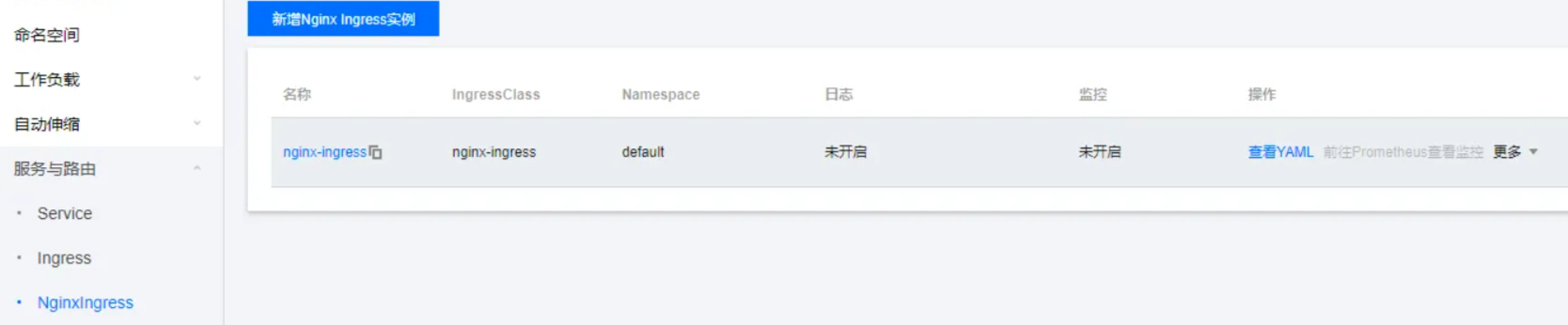
在腾讯云控制台可以看到 NGINX Ingress 实例已成功部署。
创建 NGINX Ingress 创建 nginx-ingress 指向 nginx-v1 服务。客户端请求默认路由到这个 Ingress。
1
2
3
4
5
6
7
8
9
10
11
12
13
14
15
16
17
18
19
20
21
apiVersion: networking.k8s.io/v1beta1 kind: Ingress metadata: annotations: kubernetes.io/ingress.class: nginx-ingress kubernetes.io/ingress.rule-mix: "false" kubernetes.io/ingress.subnetId: subnet-1234567 name: nginx-ingress namespace: default spec: rules: - http: paths: - backend: serviceName: nginx-v1 servicePort: 80 pathType: ImplementationSpecific status: loadBalancer: ingress: - ip: 172.28 .84 .54
创建 nginx-ingress-canary 指向 nginx-v2 服务,通过 nginx.ingress.kubernetes.io/canary: "true" 注解实现灰度。
1
2
3
4
5
6
7
8
9
10
11
12
13
14
15
16
17
18
19
20
21
22
23
apiVersion: networking.k8s.io/v1beta1 kind: Ingress metadata: annotations: kubernetes.io/ingress.class: nginx-ingress kubernetes.io/ingress.rule-mix: "false" kubernetes.io/ingress.subnetId: subnet-1234567 nginx.ingress.kubernetes.io/canary: "true" name: nginx-ingress-canary namespace: default spec: rules: - http: paths: - backend: serviceName: nginx-v2 servicePort: 80 pathType: ImplementationSpecific status: loadBalancer: ingress: - ip: 172.28 .84 .54
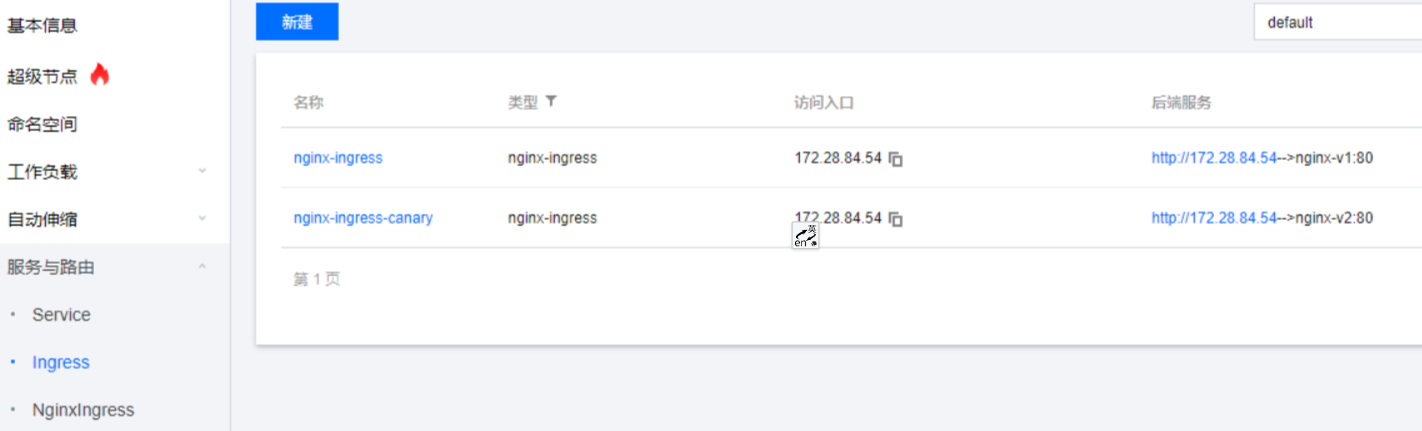
腾讯云控制台可以看到,nginx-ingress 和 nginx-ingress-canary 指向同一个访问 IP 172.28.84.54。
验证 A/B 测试 使用 curl 验证流量切分是否有效。
在未开启流量切分之前,curl 请求情况如下。
1
2
3
4
5
6
7
8
9
10
11
[root@localhost ~] nginx-v1 nginx-v1 nginx-v1 nginx-v1 nginx-v1 nginx-v1 nginx-v1 nginx-v1 nginx-v1 nginx-v1
给 nginx-ingress-canary 添加如下代码。
1
2
3
4
5
6
7
8
9
apiVersion: extensions/v1beta1 kind: Ingress metadata: annotations: kubernetes.io/ingress.class: nginx nginx.ingress.kubernetes.io/canary: "true" nginx.ingress.kubernetes.io/canary-by-header: region nginx.ingress.kubernetes.io/canary-by-header-pattern: gz|sz
在 curl 请求头添加 region=gz,请求情况如下。
1
2
3
4
5
6
7
8
[root@localhost ~] nginx-v1 [root@localhost ~] nginx-v2 [root@localhost ~] nginx-v1 [root@localhost ~] nginx-v2
验证通过,使用 nginx.ingress.kubernetes.io/canary-by-header-pattern: gz|sz 表示我们要灰度新版本到 gz 区域或者 sz 区域,客户端携带这些请求,流量就会进入灰度的 Ingress。
验证金丝雀发布 金丝雀发布主要通过权重逐步分流,基于 nginx.ingress.kubernetes.io/canary-weight 控制。
1
2
3
4
5
6
7
apiVersion: extensions/v1beta1 kind: Ingress metadata: annotations: kubernetes.io/ingress.class: nginx nginx.ingress.kubernetes.io/canary: "true" nginx.ingress.kubernetes.io/canary-weight: "10"
发起 curl 请求,响应情况如下。
1
2
3
4
5
6
7
8
9
10
11
[root@localhost ~] nginx-v1 nginx-v2 nginx-v1 nginx-v2 nginx-v1 nginx-v1 nginx-v1 nginx-v1 nginx-v1 nginx-v1
验证通过,从结果可以看出,流量约 10% 的比例被灰度版本分流。
总结 基于 NGINX Ingress Controller 实现 A/B 测试、金丝雀发布还是比较简单的,但是 NGINX reload 问题并没有彻底解决。笔者更倾向于使用 APISIX Ingress Controller 实现金丝雀发布。








 微信
微信