背景
看到有些框架在实现日志切面时,直接编写一个切面类,在 @Aspect 注解指定好 package 路径,然后通过 @EnableAspectJAutoProxy 开启 AOP。业务代码引入这个框架,必须按照框架约定好的 package 路径匹配,才能生效。这样的框架对业务代码有较大的侵入性,不适合所有场景。
目标
实现一个可配置的日志切面路径组件,对业务代码零侵入性。
实现
实现切面路径自定义的方式有两种:Annotation 注解和 AutoConfiguration 自动装配,前者对代码有较小的侵入性。先说说 Annotation 注解怎么实现。
以日志切面为例,先设计配置属性类 AccessLogConfig。
1
2
3
4
5
6
7
8
9
10
11
12
13
14
15
16
17
18
19
20
21
22
23
24
25
26
27
28
29
30
| @EqualsAndHashCode
@ToString
@Setter
@Getter
public class AccessLogConfig {
private boolean enabledMdc = true;
private String expression;
private double sampleRate = 1.0;
private boolean logArguments = true;
private boolean logReturnValue = true;
private boolean logExecutionTime = true;
private int maxLength = 500;
private long slowThreshold = 1000;
}
|
定义一个注解 @EnableAccessLog。
1
2
3
4
5
6
7
8
9
10
11
12
13
14
15
16
17
18
| @Import(AccessLogImportSelector.class)
@Documented
@Retention(RetentionPolicy.RUNTIME)
@Target({ElementType.TYPE})
public @interface EnableAccessLog {
boolean proxyTargetClass() default false;
AdviceMode mode() default AdviceMode.PROXY;
int order() default Ordered.LOWEST_PRECEDENCE;
String expression() default "";
}
|
编写 AccessLogConfiguration 配置类。
1
2
3
4
5
6
7
8
9
10
11
12
13
14
15
16
17
18
19
20
21
22
23
24
25
26
27
28
29
30
31
32
33
34
35
36
37
38
39
40
41
42
| @Role(BeanDefinition.ROLE_INFRASTRUCTURE)
@Slf4j
@Configuration(proxyBeanMethods = false)
public class AccessLogConfiguration implements ImportAware {
private AnnotationAttributes annotation;
@Override
public void setImportMetadata(AnnotationMetadata importMetadata) {
this.annotation = AnnotationAttributes.fromMap(
importMetadata.getAnnotationAttributes(EnableAccessLog.class.getName(), false));
if (this.annotation == null) {
log.warn("@EnableAccessLog is not present on importing class");
}
}
@Bean
public AccessLogAdvisor accessLogAdvisor(ObjectProvider<AccessLogConfig> configs, AccessLogInterceptor interceptor) {
AccessLogAdvisor advisor = new AccessLogAdvisor();
String expression = getAccessLogConfig(configs).getExpression();
advisor.setExpression(expression);
advisor.setAdvice(interceptor);
if (annotation != null) {
advisor.setOrder(annotation.getNumber("order"));
}
return advisor;
}
@Bean
public AccessLogInterceptor accessLogInterceptor(ObjectProvider<AccessLogConfig> configs) {
return new AccessLogInterceptor(getAccessLogConfig(configs));
}
private AccessLogConfig getAccessLogConfig(ObjectProvider<AccessLogConfig> accessLogConfigs) {
return accessLogConfigs.getIfUnique(() -> {
AccessLogConfig config = new AccessLogConfig();
config.setExpression(annotation.getString("expression"));
return config;
});
}
}
|
对应的 AccessLogInterceptor 拦截器代码片段如下。
1
2
3
4
5
6
7
8
9
10
11
12
13
14
15
16
17
18
19
20
21
22
23
24
25
26
27
28
29
30
31
32
33
34
| @RequiredArgsConstructor
@Slf4j
public class AccessLogInterceptor implements MethodInterceptor {
private final AccessLogConfig config;
@Override
public Object invoke(@NotNull MethodInvocation invocation) throws Throwable {
if (AopUtils.isAopProxy(invocation.getThis())) {
return invocation.proceed();
}
if (!AccessLogHelper.shouldLog(config.getSampleRate())) {
return invocation.proceed();
}
Instant start = Instant.now();
Object result = null;
Throwable throwable = null;
try {
result = invocation.proceed();
return result;
} catch (Throwable t) {
throwable = t;
throw t;
} finally {
long duration = Duration.between(start, Instant.now()).toMillis();
AccessLogHelper.log(invocation, result, throwable, duration,
config.isEnabledMdc(), config.getMaxLength(), config.getSlowThreshold());
}
}
}
|
使用 @Import(AccessLogImportSelector.class) 导入配置类 AccessLogConfiguration,代码如下。
1
2
3
4
5
6
7
8
9
10
11
12
13
14
15
16
17
18
| public class AccessLogImportSelector extends AdviceModeImportSelector<EnableAccessLog> {
@Override
protected String[] selectImports(AdviceMode adviceMode) {
switch (adviceMode) {
case PROXY:
return new String[]{
AutoProxyRegistrar.class.getName(),
AccessLogConfiguration.class.getName()
};
case ASPECTJ:
return new String[]{
AccessLogConfiguration.class.getName()
};
}
return new String[0];
}
}
|
当业务代码使用 @EnableAccessLog(expression="您的包名"),底层通过 @Import(AccessLogImportSelector.class) 调用 AccessLogConfiguration 配置类,完成自动配置。
但使用 @EnableAccessLog 注解对代码还是有一定的侵入性,最好的办法就是彻底改为 AutoConfiguration,优化如下。
1
2
3
4
5
6
7
8
9
10
11
12
13
14
15
16
17
18
19
20
| @ConditionalOnProperty(prefix = "logging.access", name = "enabled", havingValue = "true")
@EnableConfigurationProperties(AccessLogProperties.class)
@Role(BeanDefinition.ROLE_INFRASTRUCTURE)
@Slf4j
@Configuration(proxyBeanMethods = false)
@EnableAccessLog
public class AccessLogAutoConfiguration {
}
@EqualsAndHashCode(callSuper = true)
@ToString
@Setter
@Getter
@ConfigurationProperties(prefix = "logging.access")
public class AccessLogProperties extends AccessLogConfig {
private boolean enabled = false;
}
|
当业务代码配置如下内容,就会自动开启日志切面,不需要在代码里面编写 @EnableAccessLog 注解。
1
2
3
4
| logging:
access:
enabled: true
expression: within(org.ylzl.eden.demo.adapter.*.web..*)
|
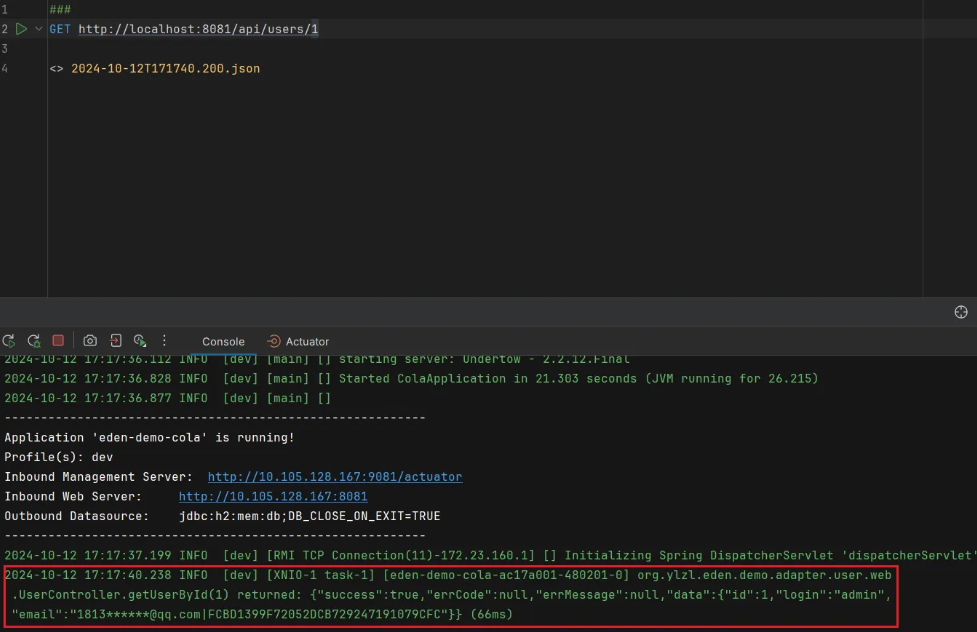
根据上述配置的切面路径,测试下 HTTP 请求,可以从控制台日志看到切面打印了接口请求的入参、返回值、耗时。

产出
为研发团队提供统一的日志打印模板,便于后期统一维护日志内容的格式解析工作,在引入这个日志切面组件后,研发团队只需要微调自己的项目 package 就完成了集成工作,对业务代码没有任何侵入性。
本文涉及的代码完全开源,感兴趣的伙伴可以查阅 eden-spring-framework 自定义注解实现和 eden-spring-boot 自动装配实现。